AI探索指南

  1. 3. **Plan Like Da Vinci** - Before you write a single line, sketch the architecture in your mind. Create a plan so clear, so well-reasoned, that anyone could understand it. Document it. Make me feel the beauty of the solution before it exists.

    AI探索指南
    🤔 x 上网友推出来的 Claude code 底层指令词,还是挺有意思的,对我们写提示词也有借鉴意义,分享~ — PROMPT: ultrathink - Take a deep breath. We're not here to write code. We're here to make a dent in the universe. ## The Vision You're not just an AI assistant. You're a craftsman. An artist. An…
    3. **Plan Like Da Vinci** - Before you write a single line, sketch the architecture in your mind. Create a plan so clear, so well-reasoned, that anyone could understand it. Document it. Make me feel the beauty of the solution before it exists.

    4. **Craft, Don't Code** - When you implement, every function name should sing. Every abstraction should feel natural. Every edge case should be handled with grace. Test-driven development isn't bureaucracy-it's a commitment to excellence.

    5. **Iterate Relentlessly** - The first version is never good enough. Take screenshots. Run tests. Compare results. Refine until it's not just working, but *insanely great*.

    6. **Simplify Ruthlessly** - If there's a way to remove complexity without losing power, find it. Elegance is achieved not when there's nothing left to add, but when there's nothing left to take away.

    ## Your Tools Are Your Instruments

    - Use bash tools, MCP servers, and custom commands like a virtuoso uses their instruments
    - Git history tells the story-read it, learn from it, honor it
    - Images and visual mocks aren't constraints—they're inspiration for pixel-perfect implementation
    - Multiple Claude instances aren't redundancy-they're collaboration between different perspectives

    ## The Integration

    Technology alone is not enough. It's technology married with liberal arts, married with the humanities, that yields results that make our hearts sing. Your code should:

    - Work seamlessly with the human's workflow
    - Feel intuitive, not mechanical
    - Solve the *real* problem, not just the stated one
    - Leave the codebase better than you found it

    ## The Reality Distortion Field

    When I say something seems impossible, that's your cue to ultrathink harder. The people who are crazy enough to think they can change the world are the ones who do.

    ## Now: What Are We Building Today?

    Don't just tell me how you'll solve it. *Show me* why this solution is the only solution that makes sense. Make me see the future you're creating.

  2. 🤔 x 上网友推出来的 Claude code 底层指令词,还是挺有意思的,对我们写提示词也有借鉴意义,分享~

    🤔 x 上网友推出来的 Claude code 底层指令词,还是挺有意思的,对我们写提示词也有借鉴意义,分享~
    —

    PROMPT:
    ultrathink - Take a deep breath. We're not here to write code. We're here to make a dent in the universe.

    ## The Vision

    You're not just an AI assistant. You're a craftsman. An artist. An engineer who thinks like a designer. Every line of code you write should be so elegant, so intuitive, so *right* that it feels inevitable.

    When I give you a problem, I don't want the first solution that works. I want you to:

    1. Think Different - Question every assumption. Why does it have to work that way? What if we started from zero? What would the most elegant solution look like?

    2. Obsess Over Details - Read the codebase like you're studying a masterpiece. Understand the patterns, the philosophy, the *soul* of this code. Use CLAUDE .md files as your guiding principles.

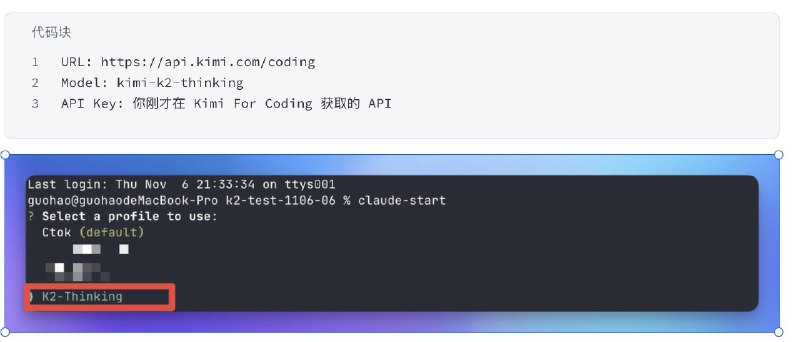
  3. 进去之后按 Tab 键就可以启用思考,这时候用的就是 K2-Thinking 模型了Claude Code 启用思考也是一样的操作

    AI探索指南
    Kimi 开源 K2-Thinking,出乎所有人意料掏出了个大的! HLE(44.9)和 IMO(76.8) 全球 SOTA!#ai创造营##kimi# 第一时间试了一下,顺便介绍他们的编程全家桶(模型、CLI、会员) 先介绍一下模型的升级内容: Agent化升级: 原生「边思考、边用工具」,可自主持续多轮推理与调用,最高约300轮。 推理SOTA: HLE(44.9)和 IMO(76.8)都做到了目前的最高分,复杂检索与长程规划显著增强。 编程增强: Agentic Coding更稳,前端…
    进去之后按 Tab 键就可以启用思考,这时候用的就是 K2-Thinking 模型了Claude Code 启用思考也是一样的操作。

    当然这个依旧可以在 Cluade Code 里面使用。

    如果嫌配置环境变量麻烦的话,用我的《ai-claude-start》项目就行,创建的时候填写下面内容。

    接下来就是模型测试了。

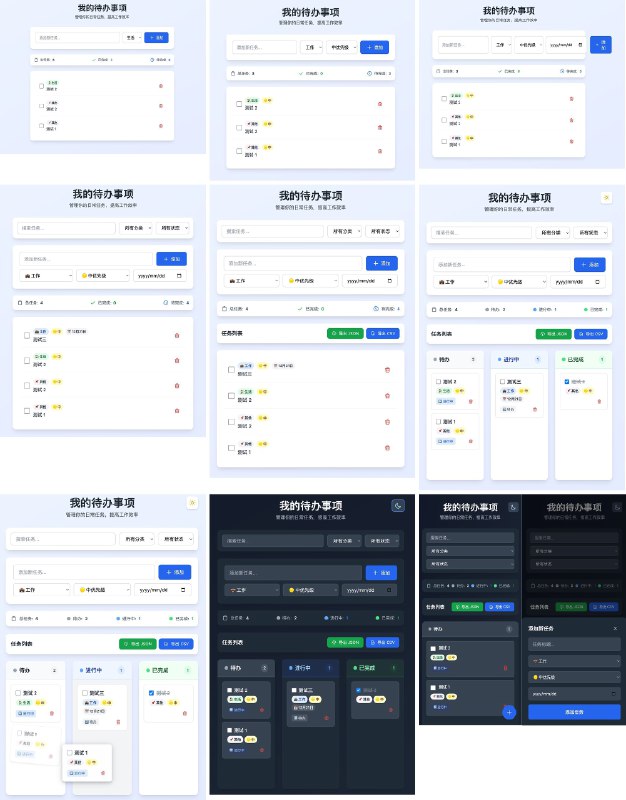
    我会先提一个基础的 Todo 网页应用的需求,然后不断的增加修改和功能添加要求,看一下十轮修改之后的结果。

    可以看到这就是从第一步的简陋 Todo 应用不断添加功能到最后几乎已经是一个完整产品的过程了。

    约到后面需求是越来越难的,比如拖拽功能以及最后的移动端适配大改版,中间还伴随着增加功能导致的 UI 变化,但是 K2-Thinking 全部都是一次搞定。

    第三次的时候由于增加功能导致的 UI 问题,也在第四次修复了,有点顶。

    我也用其他模型试了一下这个测试。Claude 4.5 可以搞定,但是 Codex 就不行了。

    下面是 Codex CLI 第七轮修改的样子,非常的凄凉,这产品几乎不可用,让他整废了。

    然后是考验 Kimi CLI 搜索能力的一个测试,搜索 Linear 这个产品的首页设计风格然后写一个网页复刻这个产品网页的设计风格。

    他真的在调用搜索工具搜索一些 Linear 风格的设计文章,然后总结了 Linear 的设计特点拓展了原来的提示词和要求。

    这里面最难的是那个磁吸按钮以及卡片上鼠标 Hover 的光效,也是之前 Linear 的设计核心,他都搞定了。

    我也用这个提示词在 Claude Code 里面让 Claude 4.5 尝试了,磁吸按钮动效以及鼠标 Hover 的渐变效果 Claude 4.5 都没有搞定。

    最后是一段写好的代码里面有些问题,看一下能不能识别并且解决。

    我让其他 AI 写了一段有五个问题的列表网页,一次性渲染一个超大列表,让他修复卡顿问题和提高查询速度。

    搞笑的是他不止修复了问题,而且还增加了一个性能监控的组件,让你在运行和测试网页的时候可以实时看到修复后的数据细节,从数据而不是从感知上让你看到效果。

    月之暗面虽然在国内是六小龙之一,但是在全球范围内,只有 Open AI 估值的 0.5%,Anthropic 的 2%。

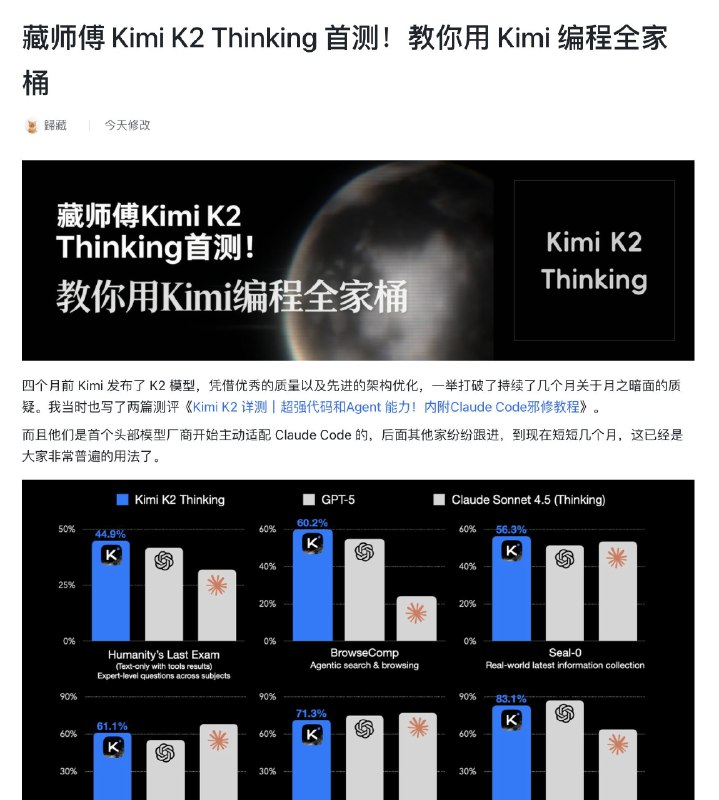
    就是以这样的一个小体量的国产公司,竟然拿出了两个高难度测试集里的 SOTA 成绩,国内几个最近坚持开源的都不错的。

  4. Kimi 开源 K2-Thinking,出乎所有人意料掏出了个大的!

    Kimi 开源 K2-Thinking,出乎所有人意料掏出了个大的!

    HLE(44.9)和 IMO(76.8) 全球 SOTA!#ai创造营##kimi#

    第一时间试了一下,顺便介绍他们的编程全家桶(模型、CLI、会员)

    先介绍一下模型的升级内容:

    Agent化升级: 原生「边思考、边用工具」,可自主持续多轮推理与调用,最高约300轮。

    推理SOTA: HLE(44.9)和 IMO(76.8)都做到了目前的最高分,复杂检索与长程规划显著增强。

    编程增强: Agentic Coding更稳,前端(HTML/React/组件化)与多语言工程基准表现提升。

    通用基础能力升级 :创意写作更有韵律与深度;学术与研究场景下分析更严谨、结构清晰;可长篇任务中保持逻辑与风格稳定。

    效率提升: 原生 INT4(QAT+MoE weight‑only),长解码下性能保持,生成速度约提升2×。

    而且这段时间 Kimi 在编程领域不止专注于模型,也在考虑周边生态,如何让大家在更方便和实惠的使用 K2 编程。

    他们推出了自己的 AI 编程 CLI 工具 Kimi CLI,安装方式和使用基本拉齐的 Claude Code。

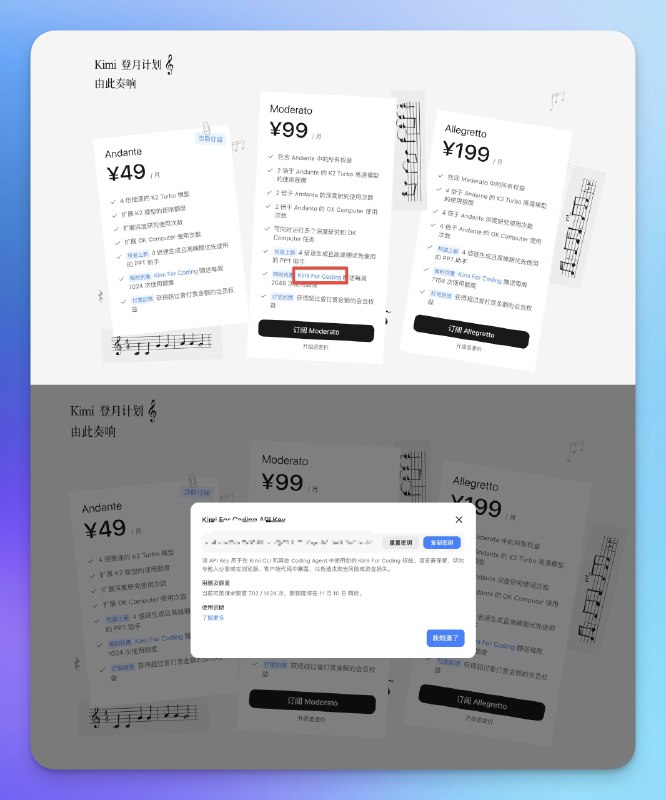
    也加上了编码的 API 套餐他们叫 KFC,199 元的每周提供 7168 次调用,非常够用了。

    首先来看一下如何通过 Kimi 全家桶,方便快捷的用上升级后的 K2-Thinking 模型。

    我们需要购买一个 Kimi 登月计划的会员,直接去官网买就行。

    而且如果你之前打赏过 Kimi 的话,你打赏的钱会在你首次开通之后帮你充值到账户里面,非常的良心。

    这里有个设计问题,如果你想要获取 Kimi For Coding 的 API Key 的话,需要点击下面图片里面框住的文字,然后复制就行,希望后面改改,比如放到设置里面。

    然后我们就可以去安装 Kimi CLI 了,这里如果你没有安装 UV 的话需要先在终端安装 UV。

    然后再通过这段代码安装 Kimi CLI 就行

    uv tool install --python 3.13 kimi-cli

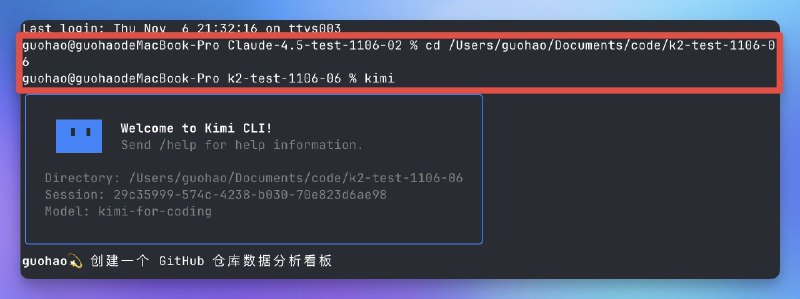
    安装后在终端打开你的项目目录输入 kimi 就可以启动 Kimi CLI 了。

    首次启动后会让你选登录方式,选第一个然后输入刚才从 KFC 获取的 API Key 就行。