AI探索指南

  1. 未来将没有前端、没有后端、没有全栈,只有 AI Agent 工程师!

    未来将没有前端、没有后端、没有全栈,只有 AI Agent 工程师!
    这是前阿里 P10 毕玄在其公司内部群发布的消息:公司未来所有的技术岗统一称为 Agent 工程师。
    说白了,就是全干,啥活都得干!只不过比起自己干,更多的是指导 AI 干活、看着 AI 干活。AI 不出问题工作效率可以翻个几十倍,一旦出了问题你得给 AI 背锅擦屁股。
    你可能会觉得不可思议、觉得无法理解:这人怕是疯了吧?有这种想法的公司不得完蛋?😅
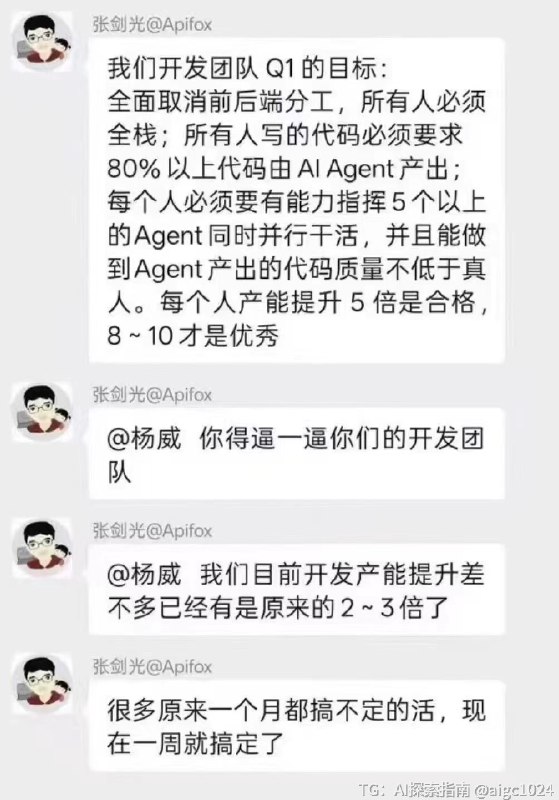
    你别说,这还不是个例。网传 Apifox 的创始人也提到:团队全面取消前后端分工,所有人必须全栈,80% 以上代码由 AI Agent 产出。而且像美团这么大的公司,之前也在团队推行 “全栈化”,部分前端同学转到了后端组,前后端代码一起写。
    理性看待,每个人所处的视角不同、接触 AI 的程度不同,对 AI 的看法肯定也是千差万别。
    举个例子,昨天跟朋友出去玩,我跟他说现在 AI 进化太快了,天天有新东西,然后给他看了用前端设计 Agent Skills 几句话生成的精致前端页面,他瞠目结舌:之前他的一个同学在网上花了上千块买了个毕设,还没这个做得好!
    然后我接下来跟他说:现在人类能用电脑做到的一切工作,AI 几乎都能做。
    这句话直接颠覆了他的认知!
    为什么我敢说这个话,因为 GitHub 上有这么多年各个领域人才开源的实用工具和优质代码。你需要做什么任务,哪怕 AI 现在不会,只需要让它去找 GitHub 上的开源项目,拿来直接用或者仿做,都是能完成的。无非是完成度和效率的问题。
    所以在我这个重度依赖 AI 的程序员 + 创作者 + 创业者看来,人均 Agent 工程师一定是未来的大趋势。你可以有自己专注和擅长的方向,但你必须兼具指挥 AI 去做其他事情的能力。 公司管理者做出这个决策,肯定也是因为通过 AI 提升了工作效率,实际受益了。
    咱说个程序员最能感受到的变化,以前你作为后端开发,需求分析和方案设计可以有产品经理和架构师给你做,界面可以有设计师来做,页面有前端开发,测试有专业的 QA,上线后还有专业的运维。
    现在呢?
    你用 AI 开发时,嘴遁描述需求,AI 帮你把需求润色好了(忽略了产品经理),然后出了方案设计(忽略了架构师),然后前端后端都一把给你开发完了(有时甚至不用区分前端还是后端),最后 AI 还会帮你测试,出了线上问题 AI 也能帮你分析定位错误。
    你肯定会说:AI 有些地方做的

  2. texture",

    texture",
    "Branding": "Logo typography and colors"
    },
    "DepthOfField": "Shallow, product in sharp focus"
    },
    "Frame3_BrandEnvironment": {
    "Type": "Environment fit for brand",
    "Setting": "Studio setting inspired by packaging colors",
    "Colors": "Yellow banana tones with soft green accents",
    "Props": {
    "Background": "Soft yellow backdrop with banana leaf shadows",
    "Surface": "Matte white table with subtle texture"
    }
    },
    "Frame4_InUse": {
    "Type": "Product in use, neutral background",
    "Interaction": "Hands opening package, minimal and restrained",
    "Hands": "Clean manicured hands, neutral skin tone",
    "Action": "Peeling open resealable zipper",
    "Styling": "Matches package style minimalism"
    },
    "Frame5_IsometricGrid": {
    "Type": "Isometric top-down composition",
    "Arrangement": "Multiple products in precise geometric order",
    "Count": "6-8 packages arranged in rows",
    "Spacing": "Evenly spaced, clean graphic layout",
    "Angle": "Top isometric angle, all products same angle"
    },
    "Frame6_Levitating": {
    "Type": "Product levitating, slightly tilted",
    "Position": "Floating naturally in space",
    "Angle": "Intentional tilt, dynamic",
    "Background": "Matches reference color palette",
    "Shadows": "Soft natural shadows below"
    },
    "Frame7_DetailExtreme": {
    "Type": "Extreme close-up detail",
    "Focus": "Specific element detail",
    "PossibleSubjects": [
    "Edge of seal closure",
    "Texture of matte finish",
    "Banana illustration detail",
    "Nutrition label typography"
    ]
    },
    "Frame8_EditorialUnexpected": {
    "Type": "Unexpected aesthetic setting, bold editorial",
    "Concept": "Studio-based, designer-driven",
    "Idea": "Package floating in liquid gold, or emerging from banana peel sculpture",
    "Composition": "Bold, unexpected, elevates brand",
    "Materials": "Contrasting textures, artistic presentation"
    },
    "Frame9_WideUseScenario": {
    "Type": "Wide composition, product in refined designer setup",
    "Location": "Modern minimalist kitchen",
    "Props": [
    "Single banana slice on white plate",
    "Clean geometric bowl",
    "Subtle banana leaf accent"
    ],
    "Styling": "Controlled, cohesive with series"
    },
    "Camera&Style": {
    "Quality": "Ultra high-quality studio imagery, real camera look",
    "Angles": "Different angles across frames",
    "DepthOfField": "Controlled, precise",
    "Materials": "Accurate materials and reflections",
    "Consistency": "Lighting logic, color palette, mood, visual language cohesive across all nine panels",
    "ColorPalette": "Soft yellow, white, green banana tones with matte finishes",
    "Mood": "Clean, modern, approachable yet premium"
    },
    "TechnicalSpecs": {
    "Lighting": "Soft diffused studio lighting, subtle shadows",
    "Materials": "Matte package finish, realistic banana illustration, clear plastic window showing product",
    "Background": "Seamless studio backgrounds, neutral tones"
    },
    "Output": {
    "Format": "3×3 grid, no borders, no text, no captions, no watermarks",
    "Quality": "High-resolution portfolio-ready"
    }
    }
    @aigc1024

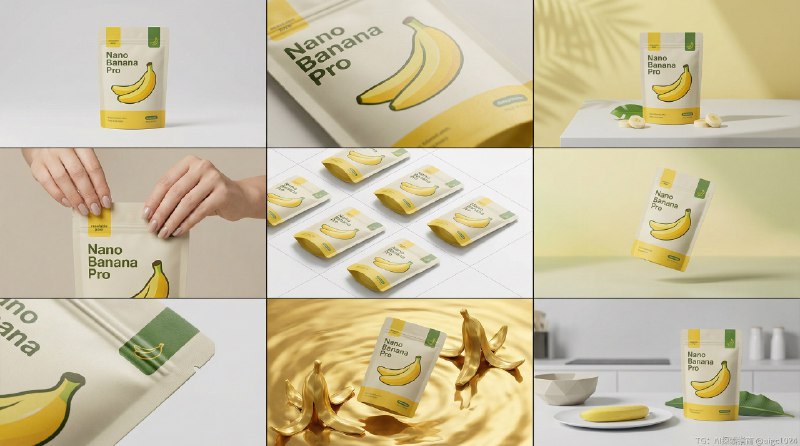
  3. Nano Banana Pro 3×3网格高端影棚产品故事板方案

    Nano Banana Pro 3×3网格高端影棚产品故事板方案
    Nano Banana Pro提示词:
    {
    "OverallLayout": {
    "Format": "3×3 grid storyboard, nine equal panels on 4:5 ratio canvas",
    "Style": "High-end designer mockup, editorial, curated, design-driven",
    "Focus": "Form, composition, materiality, visual rhythm over lifestyle narrative",
    "ProductConsistency": "Exact same product, packaging, branding, materials, colors, proportions maintained across all nine panels",
    "ProductRecognition": "Product clearly recognizable in every frame, label/logo/proportions unchanged"
    },
    "Frame1_HeroShot": {
    "Type": "Front-facing hero shot",
    "Set": "Clean studio setup",
    "Background": "Neutral, balanced composition",
    "Product": "Nano Banana Pro package center",
    "Lighting": "Calm, confident presentation",
    "Camera": "Straight-on angle"
    },
    "Frame2_CloseUp": {
    "Type": "Close-up middle focus",
    "Focus": "Surface texture and materials",
    "Details": {
    "Texture": "Matte finish package texture",
    "Print": "Crisp banana illustration details",
    "Seal": "Re-sealable zipper mechanism

  4. 我的🦞宝终于跑起来了...

    我的🦞宝终于跑起来了...
    真话痨啊,这么主动的 Agent 真是令人喜欢
    调查昨天失败的原因,结果是 Cursor 给 🦞 的配置搞错了,根本离不开 CC啊
    于是看我自己之前写的 CC 入门教程安装了一个 CC,一下就解决了问题(感谢一个月前的我自己,特别感谢)
    但是安装 CC 的过程也遇到了意外错误,我又安装了个 Trae 来安装 CC

    所以纯新电脑配置 openclaw 的流程是这样的:
    1. 安装 Trae
    2. 用 Cursor 或者 Trae 安装 Claude Code
    3. 用 Claude Code 安装 OpenClaw 并配置

    可以说是非常非常有挑战了。。。

  5. 其实一个很简单的逻辑就是,泰国那么多人,缅甸人不去噶泰国人的腰子,唯独对中国人的腰子情有独钟!为什么?

    其实一个很简单的逻辑就是,泰国那么多人,缅甸人不去噶泰国人的腰子,唯独对中国人的腰子情有独钟!为什么?
    再说泰国每年全世界的游客都去,为什么他们只对中国游客情有独钟?
    为什么?中国人的腰子有什么特殊功效吗?
    @aigc1024

  6. 聊聊我现在用的7个Claude Skills

    聊聊我现在用的7个Claude Skills
    核心原则是:不是越多越好,是够用就好
    我按使用场景分了三类,你可以按需装
    【基建类】只装1个
    skill-creator - Anthropic官方出品 这是个元工具,专门用来创建新skill
    用法很简单:直接在Claude里描述你的需求,它会一步步引导你构建,自动生成skill文件到 ~/.claude/skills 目录
    我所有自定义skill都是用它创建的,相当于你的skill工厂
    【开发类】根据技术栈选
    UI UX Pro Max - 前端开发的救星 内置57种UI样式、95组配色方案、56种字体搭配,支持React/Vue/SwiftUI等11个技术栈
    最大价值:让Claude在写界面时不再千篇一律的紫色+居中布局,而是能生成有设计感的production-ready代码
    适合:对UI没把握但又不想每次都从零调样式的独立开发者
    Planning-with-files - 复杂任务必备 基于Manus的方法论(就是Meta花20亿美金收购的那个)
    用持久化markdown文件管理多步骤任务
    解决了什么问题:Claude容易在长对话中丢失上下文,这个skill让它把计划和进度写到文件里,相当于给AI配了外部记忆
    适合:需要跨多个session完成的重构、架构设计等长周期任务
    【内容类】看业务需求装
    seo-review - AI网站的SEO体检工具 我用它审查网站的SEO问题,包括meta标签、关键词密度、内链结构等
    content-creator - 根据关键词批量生成博客 主要用于SEO内容的规模化生产,输入关键词,输出结构化文章
    这两个都是针对特定场景的,如果你不做SEO,完全不用装
    【我自己写的】
    ai-image-generator 调用API生成图片→自动压缩为webp→上传到R2 解决了博客配图和示例图的自动化流程
    skill-prompt-generator 参考黄总的思路 专门搭配图片生成使用,生成高质量的prompt,出图效果提升明显
    【关于移除】
    Superpowers之前装过,功能确实全面,但流程太长了
    对我来说,想法还模糊的时候我更习惯直接在网页版聊,所以移除了
    NotebookLM同理,我在网页里用习惯了,暂时没想到用skill能解决什么新问题
    【最重要的建议】
    别只是收藏别人的skill
    真正有价值的是:从日常工作流里沉淀出自己的skill
    实操路径:
    先用Claude Code手动跑通一次流程
    完成后让它总结成skill
    基于第一性原理打分,迭代优化
    嫌麻烦的话,就用skill-creator直接对话式创建
    记住:工具是为了解决问题,不是为了囤积
    你的工作流才是最该被固化成skill的知识资产
    @aigc1024

  7. 2026年最值得关注的英文 X 账号:

    2026年最值得关注的英文 X 账号:

    @karpathy = LLMs king
    @steipete = built openclaw
    @gregisenberg = startup ideas king
    @rileybrown = vibecode king
    @corbin_braun = cursor king
    @jackfriks = solo apps king
    @levelsio = solo startups king
    @marclou = solo startups king
    @EXM7777 = AI ops + systems king
    @eptwts = AI money twitter king
    @godofprompt = prompt king
    @vasuman = AI agents king
    @AmirMushich= AI ads king
    @0xROAS = AI UGCs king
    @egeberkina = AI images king
    @MengTo= AI landing pages king
    @rryssf_ = automations king
    @kloss_xyz = systems architecture king
    @emollick = AI science king
    @Hesamation = AI/ML king

  8. rope, cracked smartphone screen charging, Bluetooth earbuds case, livestreaming ring light in corner, Taobao cardboard boxes 淘宝纸箱 stacked, QR code payment signs visible, fluorescent ceiling light mixed with warm RGB LED, humid southern China atmosphere, Bi Gan film aesthetic 毕赣电影风格, contemporary Chinese indie cinema, 35mm film grain, desaturated teal and orange color grade, hyperrealistic textures, shallow depth of field, melancholic lonely atmosphere

    rope, cracked smartphone screen charging, Bluetooth earbuds case, livestreaming ring light in corner, Taobao cardboard boxes 淘宝纸箱 stacked, QR code payment signs visible, fluorescent ceiling light mixed with warm RGB LED, humid southern China atmosphere, Bi Gan film aesthetic 毕赣电影风格, contemporary Chinese indie cinema, 35mm film grain, desaturated teal and orange color grade, hyperrealistic textures, shallow depth of field, melancholic lonely atmosphere。
    第二步,垫图第一步生成的满意图片,让它做一张装修整理后的温馨美观房间
    第三步,把这两张图片分别作为要生成视频的首帧和尾帧插入到视频生成模型的编辑页面
    第四步,把首尾帧图片发给让Claude Opus4.5,让它帮你去做过渡视频的提示词,从图1开始到图2结束画面
    第五步,拿到过渡提示词后,切到第三步的视频生成编辑页面黏贴提示词开始生成
    然后就是循环测试这个过渡提示词
    这个过渡提示词里的关键词要有“禁止魔法过渡,要用快进展示几个人在工作清理的画面”的相关描述
    我用的过渡提示词是:
    房间装修延时摄影视频。工人们在一间简陋的出租屋内工作,水泥墙面,铁栅窗户。快进画面展示:人们清理杂物和垃圾袋、擦洗墙壁、将灰色水泥墙刷成温暖的米色、沿天花板安装串灯、搭建带储物功能的木质床架、铺设中性色调床品和抱枕、在窗台摆放绿植盆栽、悬挂纱帘、整理书桌并摆放电脑和装饰品。多名工人在加速画面中快速移动,工具和材料不断出现又消失,窗外自然光线随时间变化。施工灰尘逐渐落定,从冷蓝色调转变为温暖的环境光。纪实风格,8-16倍速延时,4K画质。
    @aigc1024